- Part 1. What type of battery does a Ring Doorbell use?
- Part 2. Ring Doorbell battery models and compatibility chart
- Part 3. How long does a Ring battery last?
- Part 4. Why is my Ring battery draining so fast?
- Part 5. How to replace a Ring Doorbell battery
- Part 6. How to choose the right Ring replacement battery
- Part 7. Ring battery replacement cost
- Part 8. Ring battery maintenance checklist
- Part 9. FAQs
A Ring Doorbell depends on a rechargeable lithium battery to power motion detection, video recording, Wi-Fi communication, and real-time alerts. While Ring batteries are designed to last for months under normal conditions, battery life can vary significantly depending on usage frequency, weather, Wi-Fi strength, and device settings. Ring officially states that battery-powered models can be charged through USB or USB-C depending on the model, while some newer devices use removable Quick Release Battery Packs for easier replacement.
If your Ring Doorbell battery drains quickly, stops charging, or no longer lasts as long as before, replacing the battery may restore performance. This guide explains Ring battery types, replacement methods, battery lifespan, common drain issues, and how to choose the right replacement battery.
Key takeaways
- Most Ring Doorbell devices use rechargeable lithium-ion batteries designed for repeated charging.
- A Ring battery typically lasts several months, but actual lifespan depends on motion activity, video usage, temperature, and network conditions.
- Removable battery models allow quick Ring battery replacement without replacing the entire device.
- Frequent motion alerts, weak Wi-Fi signals, and cold weather are common reasons for faster battery drain.
- Choosing a compatible replacement battery requires checking voltage, capacity, size, connector design, and protection features.
- Proper maintenance can significantly extend battery performance and overall lifespan.
Part 1. What type of battery does a Ring Doorbell use?

Most battery-powered Ring Doorbells use rechargeable lithium-ion battery technology because it provides a good balance between energy density, weight, charging efficiency, and lifespan.
Lithium-ion batteries work by moving lithium ions between the positive and negative electrodes during charging and discharging. This technology allows compact devices such as video doorbells and security cameras to operate wirelessly while supporting power-hungry features such as HD video recording, motion detection, and wireless communication.
Depending on the model, Ring devices may use either a built-in rechargeable battery or a removable rechargeable battery pack. Some newer models feature Quick Release Battery Packs, allowing users to remove the battery without uninstalling the entire doorbell.
Part 2. Ring Doorbell battery models and compatibility chart
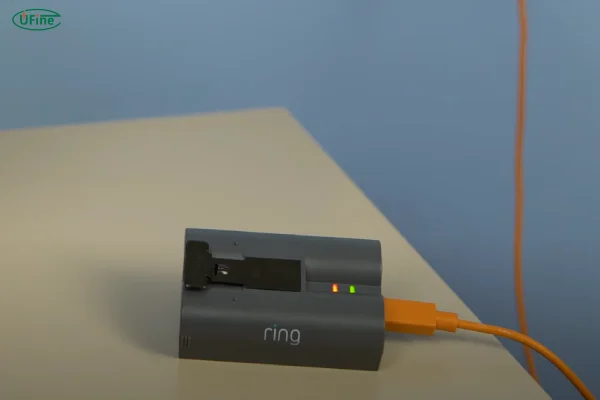
Before purchasing a replacement battery, you should identify your Ring Doorbell model because different generations use different battery designs.
| Ring model | Battery type | Replacement method |
|---|---|---|
| Ring Video Doorbell (1st Gen) | Built-in rechargeable lithium battery | Charge through device |
| Ring Video Doorbell 2nd Gen | Built-in rechargeable battery | Charge through device |
| Ring Video Doorbell 3 | Removable Quick Release Battery Pack | Remove and replace battery |
| FAing Video Doorbell 4 | Removable Quick Release Battery Pack | Remove and replace battery |
| Ring Battery Doorbell | Built-in rechargeable battery | Charge through device |
| Ring Battery Video Doorbell Plus | Quick Release Battery Pack | Replace removable battery |
Ring models with removable battery packs are generally easier to maintain because you can keep a spare battery charged and swap batteries without waiting for the device to recharge.
When checking compatibility, do not only compare the physical size. A replacement battery should also match:
- Voltage requirements
- Battery chemistry
- Connector design
- Protection circuit
- Physical dimensions
Part 3. How long does a Ring battery last?
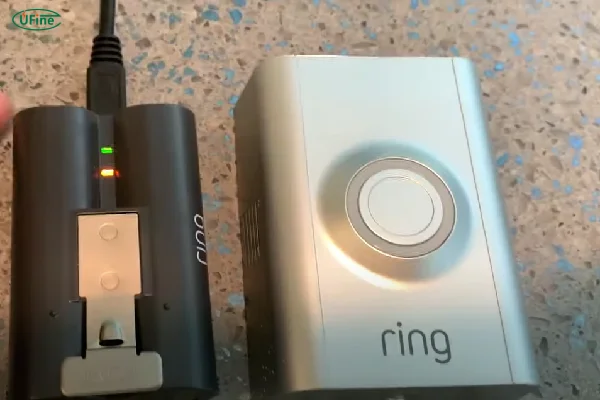
Under normal conditions, a Ring Doorbell battery can often last several months before requiring a recharge. However, there is no fixed battery lifespan because real-world usage varies greatly.
A device installed near a busy street may activate dozens or hundreds of times per day, while a doorbell installed in a quiet residential area may use significantly less power.
| Usage condition | Expected battery performance |
|---|---|
| Low motion activity | Around 6–12 months |
| Normal household usage | Around 3–6 months |
| Heavy motion detection and frequent Live View | Several weeks to a few months |
Factors affecting Ring battery life include:
Motion detection frequency
Every time the camera detects movement, it wakes up, records video, processes data, and communicates through Wi-Fi. Frequent alerts can significantly increase power consumption.
Live View usage
Watching live video requires continuous operation of the camera, processor, and wireless connection, making it one of the fastest ways to drain the battery.
Weather conditions
Lithium-ion batteries perform less efficiently in extremely cold environments. Low temperatures can temporarily reduce available capacity, causing the battery percentage to drop faster.
Wi-Fi signal strength
A weak Wi-Fi connection may force the device to use more power to maintain communication with your router.
When should you replace a Ring battery instead of charging it?
A rechargeable battery naturally loses capacity over time. Replacement may be needed when:
- Battery lasts only a few days after a full charge
- Battery percentage drops suddenly
- The device shuts down frequently
- Battery cannot reach full charge
- Battery shows physical damage or swelling
A battery that charges normally but drains faster than before may simply have reached the end of its useful cycle life.
Estimate battery life with our online calculator:
Part 4. Why is my Ring battery draining so fast?
If your Ring battery only lasts days or weeks instead of months, the battery itself may not always be the problem. Several environmental and usage factors can cause faster battery drain.
Too many motion events
A common reason for rapid battery loss is excessive motion detection.
For example:
- A camera facing a busy sidewalk
- Cars passing frequently
- Trees moving in strong wind
- Animals triggering alerts
Reducing motion zones or lowering motion sensitivity can help extend battery life.
Weak Wi-Fi connection
Your Ring Doorbell needs a stable wireless connection to send notifications and upload video. When the signal is weak, the device may consume additional power trying to maintain communication.
Extreme temperatures
Cold weather can temporarily reduce lithium battery capacity, while excessive heat can accelerate battery aging.
For best performance:
- Avoid direct sunlight exposure for long periods
- Protect devices from extreme temperature conditions
- Monitor battery performance during seasonal changes
Frequent video recording
High video quality, long recordings, and frequent Live View sessions require more energy. If your battery drains quickly, review your Ring app settings and reduce unnecessary activity.
Part 5. How to replace a Ring Doorbell battery
Replacing a Ring Doorbell battery depends on whether your device uses a removable battery pack or a built-in rechargeable battery. Models with a Quick Release Battery Pack are easier to replace because you can remove the battery without taking down the entire device.
Before replacing the battery, prepare:
- A fully charged replacement battery
- The Ring security screwdriver (for compatible models)
- A clean and dry working area
Step 1: Check your Ring battery status
Open the Ring app and check:
Menu → Devices → Device Health → Battery Level
If the battery percentage drops quickly or the device frequently disconnects, replacement may be necessary.
Step 2: Remove the faceplate
For Ring Doorbells with removable batteries:
- Remove the security screw at the bottom of the device.
- Carefully remove the faceplate.
- Locate the battery release mechanism.
Step 3: Remove the old battery
Press the release tab and slide the battery pack out of the compartment.
Avoid pulling forcefully or using metal tools because damaging the battery housing may create safety risks.
Step 4: Install the replacement battery
Insert the new battery until it clicks into place.
Make sure:
- The battery is fully seated
- The connector is aligned correctly
- The battery cover is properly installed
Step 5: Test your Ring Doorbell
After installation:
- Open the Ring app
- Check the battery percentage
- Test Live View
- Confirm motion alerts work properly
For built-in battery models, the process is different because the battery cannot be quickly removed. These devices usually need to be charged through the charging port rather than swapping the battery pack.
Part 6. How to choose the right Ring replacement battery
When looking for a Ring battery replacement, compatibility is more important than simply choosing the battery with the highest capacity.
A suitable replacement battery should match several key specifications.
Battery voltage
The replacement battery must provide the correct voltage for the device. Using an incompatible voltage may cause unstable operation or damage the electronics.
Battery capacity
Capacity is measured in milliamp hours (mAh). A higher-capacity battery can theoretically provide longer runtime, but only when the voltage, size, charging system, and protection circuit are compatible.
For example:
- Higher mAh → potentially longer operating time
- Larger capacity → may require a larger battery size
- Incorrect capacity → may affect charging performance
Battery chemistry
Most Ring battery packs use rechargeable lithium-ion technology because it provides:
- High energy density
- Lightweight design
- Stable discharge performance
- Rechargeable operation
Lithium-ion batteries are commonly used in portable electronics because they can store more energy in a compact package compared with older battery technologies.
Protection circuit design
A professional lithium battery pack normally includes protection features such as:
- Overcharge protection
- Over-discharge protection
- Short-circuit protection
- Temperature protection
These safety functions help prevent abnormal charging and improve battery reliability.
Ring also recommends using qualified lithium-ion batteries designed for compatible devices because unsuitable batteries may affect performance or create safety risks.
Part 7. Ring battery replacement cost
The cost of replacing a Ring battery depends on whether you purchase an official battery pack or a compatible alternative.
Typical price ranges:
| Replacement option | Estimated cost |
|---|---|
| Official Ring Quick Release Battery Pack | Around $35 |
| Compatible third-party battery pack | Around $15–$30 |
| Professional replacement service | $50+ |
For users who frequently need to recharge their Ring Doorbell, purchasing an additional battery pack can be more convenient because you can swap batteries immediately instead of waiting for charging.
Part 8. Ring battery maintenance checklist
Proper maintenance can help your Ring battery maintain better performance and reduce unnecessary replacements.
Keep motion detection settings optimized
High sensitivity settings and large motion zones may trigger frequent recordings.
Consider:
- Reducing unnecessary motion zones
- Adjusting motion sensitivity
- Avoiding areas with constant movement
Avoid extreme temperatures
Lithium-ion batteries perform best under moderate temperatures.
To improve battery lifespan:
- Avoid prolonged exposure to direct sunlight
- Protect devices from freezing temperatures
- Monitor battery performance during winter
Keep battery contacts clean
Dust or oxidation on battery contacts may affect charging performance.
Clean the contacts carefully using a dry cloth if needed.
Avoid completely draining the battery frequently
Repeated deep discharge can accelerate battery aging.
Charging the battery before it reaches a critically low level may help maintain long-term performance.
Keep a spare battery available
For Ring models with removable batteries, keeping an extra charged battery can prevent downtime and make replacement easier.
Part 9. FAQs
1. Why is my Ring Doorbell battery not charging?
A Ring battery may fail to charge because of a damaged charging cable, dirty charging contacts, extreme temperatures, or an aging battery cell. Try using another charging cable, cleaning the contacts, and charging the battery at room temperature before replacing it.
2. Does video quality affect Ring battery consumption?
Yes. Higher video quality settings require more processing power and data transmission, which can increase energy consumption. Lowering video quality may help extend battery runtime in high-activity locations.
3. Can I leave my Ring battery plugged in all the time?
For removable Ring batteries, occasional charging is recommended rather than keeping them connected indefinitely. Long-term exposure to heat during charging can contribute to battery aging.
4. Why does my Ring Doorbell restart when the battery is low?
When battery voltage drops below the device’s operating requirement, the Ring Doorbell may shut down or restart to protect the electronics and prevent unstable operation.
Related Tags:

More Articles

Best 24V Lithium Battery: Top 10 Compared
Discover the top 24V lithium batteries. We compare capacity, price, cycle life, safety features, and the best options for different applications.
Top LFP Cell Manufacturers in China You Should Know
Looking for reliable LiFePO4 cells? Explore China's top LFP battery manufacturers, key technologies, production capabilities, and supplier selection tips.
Check If Your Charger Works: Simple Test Guide
Think your battery charger's broken? Quick tests can show you for sure. See if it’s the charger or the battery that's causing issues. Read more.
Best Camera Batteries: 7 Brands Compared & Tested
Looking for the best camera battery? Compare 7 top brands, including OEM and third-party options, to find the right battery for your camera.
What You Need to Know About Portable Fan Batteries
Discover the best portable electric fan battery, its types, lifespan, and maintenance tips. Learn how to choose the right one and keep it running longer.